Are your trading bots failing with API Error -1021? In the 2026 high-frequency market, millisecond precision is everything. This error occurs when the time difference between your server and the exchange’s server exceeds the recvWindow (usually 5000ms).
Whether you are hosting on AWS, Google Cloud, or Alibaba Cloud, follow this guide to sync your clock and stop the rejected orders.
Step 1: Check your System Clock Drift
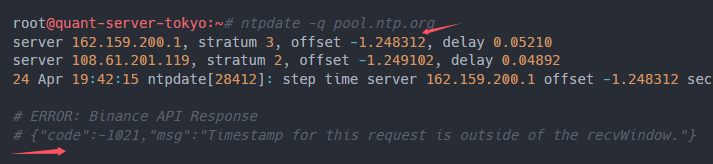
On a Linux/Ubuntu server, run this command to see your current offset:
ntpdate -q pool.ntp.org
If your offset is greater than 500ms, your bot is in the “Danger Zone.”
Step 2: Force Time Sync (The 2026 Fix)
Instead of waiting for the system to sync, force a high-precision update using Chrony:
- Install Chrony: sudo apt install chrony
- Force Update: sudo chrony-wait
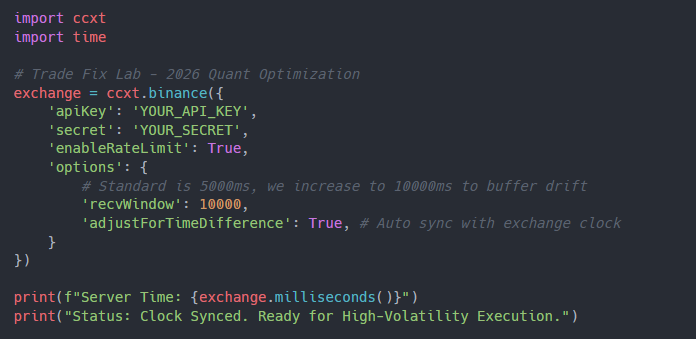
- Set your Code’s recvWindow: In your Python/CCXT script, manually increase the window to 10,000ms as a temporary buffer:
exchange.options[‘recvWindow’] = 10000
Step 3: Use a Proxy Near the Exchange Hub
If you are in Europe trading on a server located in Tokyo, the network latency adds to the timestamp gap.
- Pro Tip: Move your server to Tokyo (AWS ap-northeast-1) for Binance/OKX for sub-10ms execution.
🛑 Tired of “Timestamp” Headaches and Rigid API Rules?
Professional quants are migrating to Bitget in 2026. Why? Because their API infrastructure is built for high-concurrency without the annoying synchronization traps found in legacy platforms.
Why Bitget is the Quant Choice in 2026:
- V2 API Stability: Lower frequency of -1021 errors through optimized timestamp logic.
- VIP Developer Support: Direct access to technical integration teams.
- 20% Fee Rebate: Keep more of your quant profits.
👉 [Upgrade to Bitget Professional API & Claim $80 Quant Bonus]
🔗 Link: https://share.glassgs.com/u/X98DHWFQ?clacCode=RB79RVR2
(Use Invite Code: RB79RVR2 to lock in your VIP developer status for 2026.)